Starting a Club
The short version. Sign in, scroll to Your clubs, type a name and tap Start a club. Set your house rules once on the club card, tap Copy invite and send the link to your group. On club night, tap Open our table.
A club is your group’s own table on Sheepshead Club: your house rules, kept between nights, a board of who is up and who is down, and a table nobody outside the club can see. It is free, like everything here.
The pictures are from a phone, using an example club called Thursday Regulars.
1. Make an account
A club belongs to an account, so start by making one: on the front page, pick a name, a password and an email (only used to reset a forgotten password), and tap Create free account. Already have one? Sign in.
2. Start the club
Scroll down the front page to Your clubs; on a phone it is near the bottom. Type your club’s name and tap Start a club.
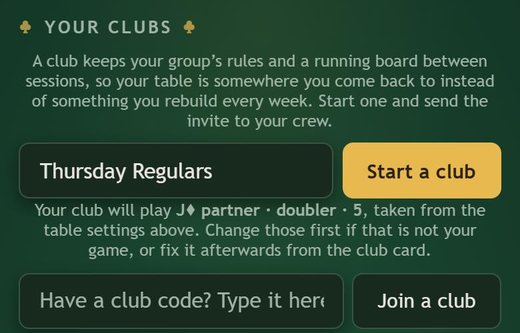
The line under the box says which game the club will start with. If it is not yours, that is fine: you set the club’s rules in step 4.
3. Your club card
Your new club has a card under Your clubs, and from now on it also sits at the top of the front page for you and every member. The card shows the club’s board, its champions for the quarter, and the buttons you will use: Open our table, Copy invite and View members. It also has the season spreadsheet: who sat where and how each night went, by day, week, month, quarter or year.
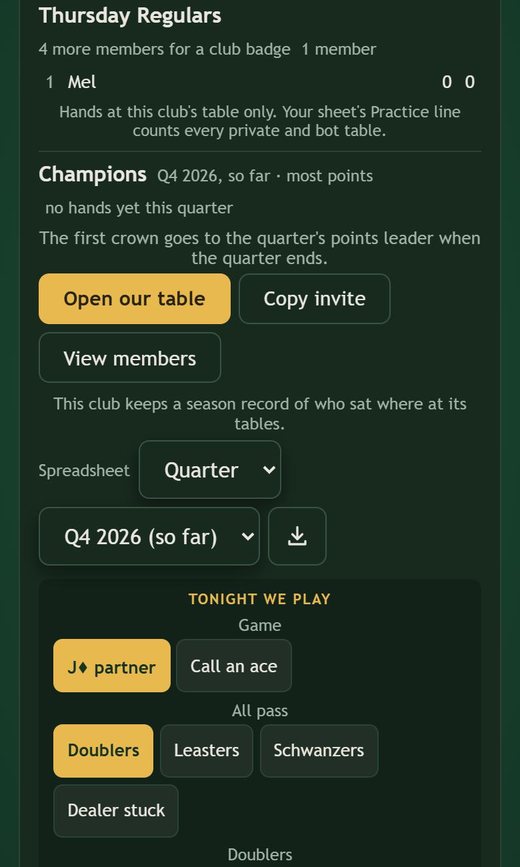
4. Set your rules once
Below the buttons, under Tonight we play, are your club’s rules. Only you, the club’s owner, see them. Set them once and every club table opens with them; a change applies to the next table you open, not one already running.
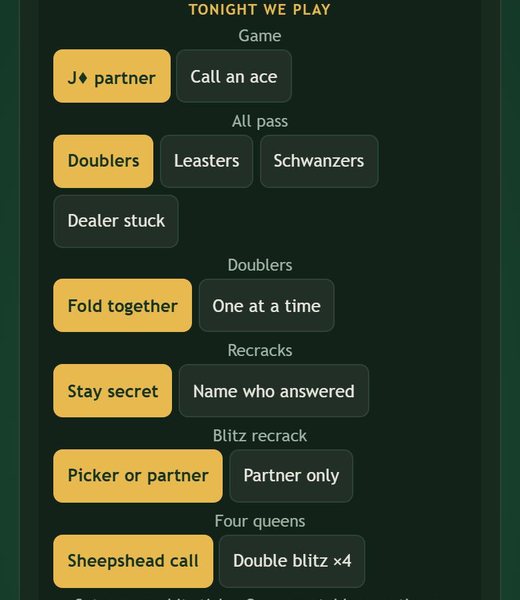
- Game: jack of diamonds partner or call an ace. At call an ace you also choose who sees the card under.
- All pass: what happens when everybody passes: doublers, leasters, schwanzers or dealer stuck. With doublers you also choose whether a run of them folds together or is worked off one at a time.
- Recracks, Blitz recrack, Four queens: the finer points of cracking and blitzes, set to what your table plays.
- Season record, Awards, Ranking: whether the club keeps its spreadsheet, crowns quarter and year leaders, and ranks by most points or points per hand.
- Official game: whether a hand counts on the board with any number of people at the table, or only with 3, 4 or all 5. Hands with fewer people (bots fill the rest) are left out of the standings and marked in the spreadsheet.
Want your table to play exactly like another club’s? Some settings, like a live crack window, are set up for a club on request. Email support@sheepsheadclub.com with your club’s name and the club you want to match, and we will copy its settings onto yours.
5. Invite your group
Tap Copy invite on the club card; it copies your club’s link, ready to paste into a text or an email. Anyone who follows it is added to the club once they have an account, and is taken to the club’s table. Send them the joining guide along with it; it shows each step from their side.
Or read the club’s code out loud: it is printed on the card, and anyone can type it into Have a club code? under Your clubs. With five members a club can set a short badge that shows beside its members’ names.
6. Club night
Tap Open our table. While the club waits for people the table holds the seats open; members who arrive tap Join our table and sit straight down. When you are ready, tap Fill with bots & deal to put computer players in any empty seats and start. Pick how strong the computer players are for the night: Easy, Hard or Tournament.
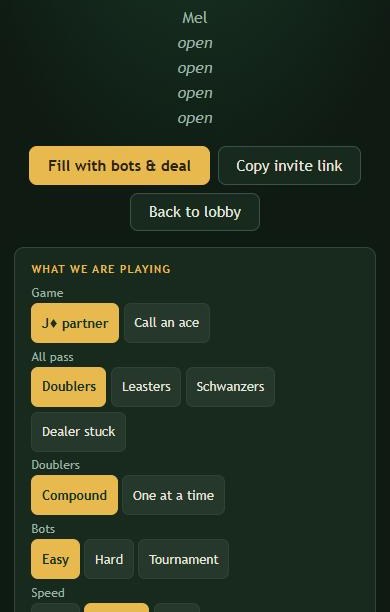
Someone who arrives after the cards are dealt watches the hand in progress and takes over a computer player’s seat when it ends. If every seat is already a person, the next member gets a second club table with the same rules, and its hands count on the same board.
Questions
Can people outside the club see our table?
No. A club’s table is listed only for its members, and its board and spreadsheet are the club’s own.
Does a club cost anything?
No. Clubs, tables, the board and the spreadsheet are free, with no ads.
We play six-handed with the dealer sitting out. Can a club do that?
Yes. Tables go from three to six players; at six the dealer sits out each hand. See six-handed sheepshead.
Who do I ask for help?
support@sheepsheadclub.com, or tap Report a bug at the bottom of the front page.